Screen Mirroring
Screen Mirroring is a cutting-edge app designed to bridge the divide between your handheld device and the grand display of your TV screen. With a simple, cable-free setup, this app ensures that what you see on your small screen is replicated in high definition on a larger one, be it for personal enjoyment or professional presentation.
Key Features:
- 📺 Seamless casting of your smartphone screen to a larger TV screen, ensuring stability and real-time transfer.
- 📚 Supports a wide array of media formats, including photos, audio files, E-books, and PDFs among others.
- 🌐 Highly compatible, allowing you to mirror devices such as iPhone, iPad, Android, Windows, Mac, or Chromebook onto any receptive display.
- ⚙️ Cable-free connection with easy setup, providing live streaming in HD quality.
- 🤝 Dedicated customer support available via Email, AI-powered Chat, and an extensive FAQ to assist you at any point.
Pros:
- 👌 User-friendly interface simplifies the mirroring process for all user levels.
- 💼 Offers a professional solution, ideal for presentations and meetings where screen sharing is essential.
- 📶 Encourages productive multitasking by freeing up your mobile device while casting.
- 🔒 Prioritizes user privacy and service quality with top-notch customer support ready to address your queries.
Cons:
- 📡 Requires a stable Wi-Fi connection for both your smart device and TV, which can be restrictive in some circumstances.
- 📲 Compatibility depends on whether your devices support wireless display/Miracast and screen mirroring functions, which might not be ubiquitously available.
- ⚠️ VPN usage can interfere with connection setup, possibly requiring additional steps for users who utilize these services.
How to Use:
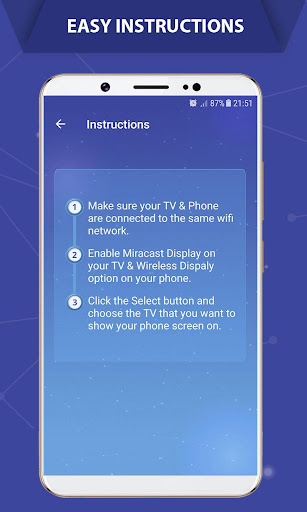
- Connect both your phone/tablet and smart TV to the same Wi-Fi network.
- Activate “Wireless display” on your phone.
- Turn on “Miracast” on your smart TV.
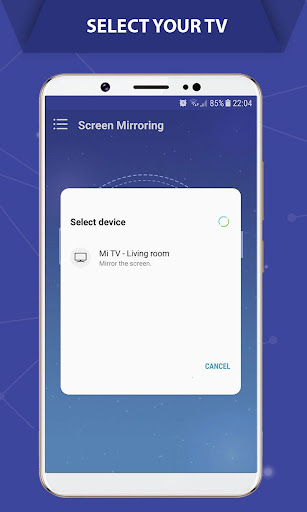
- Search for and pair your device with the TV.
Attention Before You Start:
- Confirm that both your TV and Android device support the wireless display/Miracast and screen mirroring function.
- Ensure that both devices are linked to the same Wi-Fi network for optimal functionality.
- It’s recommended to turn off any VPN services for a successful connection.
Price:
💵 Screen Mirroring is a free application, though it may include in-app purchases for additional features not detailed in the provided information.
By ensuring real-time, high-quality screen sharing functionality, the Screen Mirroring app consolidates ease of use with powerful performance, connecting your world more seamlessly than ever before. Whether you're streaming your favorite series, sharing memories with friends and family, or conducting a business presentation, this app is your go-to solution for screen mirroring.
 گھر
گھر  ٹاپ چارٹس